Core Concept: Providers
Providers are the underlying AI engines (Large Language Models) that process your text and generate responses. Rephlo is a universal interface — you can swap these "brains" in and out per task, and a single provider can expose several models (see Models & Inference).
Provider Types
Rephlo supports 8 Bring-Your-Own-Key (BYOK) provider types plus a Rephlo-managed Dedicated API:
Cloud Providers (Internet Required)
- OpenAI — GPT-class models. Industry standard for reasoning, coding, and creativity.
- Anthropic — Claude models; known for high-quality writing, large context windows, and prompt caching (on by default).
- Groq — Ultra-fast inference on custom LPU chips — near-instant responses.
- Google — Gemini models with strong multimodal capabilities.
- xAI (Grok) — Grok models with optional real-time Live Search.
- OpenRouter — A unified gateway to 100+ models from many vendors, with tracking via Site URL / Site Name.
- OpenAI-Compatible — Connect to any service implementing the OpenAI API spec (Azure OpenAI, vLLM, LocalAI, LiteLLM, LM Studio, custom proxies). Requires API Key, Base URL, and Model Name.
Local Provider (Complete Privacy)
- Ollama — Run open-source models (Llama, Mistral, Gemma, DeepSeek, Qwen) directly on your computer. Your data never leaves your machine. Configurable Base URL (default
http://localhost:11434); an optional Ollama API key enables web search.
Azure OpenAI is connected through the OpenAI-Compatible type — choose OpenAI-Compatible and enter your Azure deployment endpoint as the Base URL (and your deployment name as the Model Name). It is not a separate entry in the add-provider list.
On-device models: Rephlo also runs GGUF models fully on-device (no internet, no Ollama) via a built-in engine. That's a related but separate inference path — see On-Device Models and Models & Inference.
Managed Provider
- Dedicated API — Rephlo's managed cloud option using OAuth 2.0. The simplest setup for users who don't want to manage API keys; usage is tracked with credits. Its configuration is auto-created and hidden from the regular provider list.
Want a BYOK/on-device-only picker? Turn on Hide online models from Rephlo Gateway under Providers to hide Dedicated (Gateway) models from every model picker.
On-Device vs BYOK
These two bring-your-own-model paths are easy to confuse:
- On-Device — open models (GGUF) running locally on your machine via the built-in engine. No API key, no internet, fully private; nothing leaves your computer.
- BYOK (Bring Your Own Key) — you supply your own API key for an external provider (a cloud vendor, or local Ollama). Requests go to that provider under your key, and the vendor bills you directly.
Both On-Device and BYOK are Pro-tier features — using them requires an active Pro plan (or higher) or a perpetual license. For on-device models that gate covers both downloading and running them; once unlocked, they run with no credits and fully offline. Set up keys under Providers.
Platform Dedicated API vs Enterprise BYOK
- Dedicated API is Rephlo-managed hosted inference: sign in and use Rephlo's frontier models, billed in credits, with no keys to manage.
- Enterprise BYOK (over the platform) is for organizations that centrally configure their own provider keys and allowed models at the org level, so every member uses the org's models and keys — for compliance and cost control.
In short: the Dedicated API trades keys for credits and zero setup, while Enterprise BYOK keeps key management central to the organization. Personal BYOK keys are configured under Providers.
Provider Mode
Each provider operates in one of two modes: BYOK (you supply the vendor key) or Dedicated (Rephlo-managed with credit tracking).
Connection Modes
Dedicated Mode (Managed)
- Description: Rephlo manages the connection and billing via OAuth 2.0; usage draws from your credits.
- Pros: Zero setup, managed billing.
- Cons: Less low-level control over model parameters.
BYOK Mode (Bring Your Own Key)
- Description: You use your own vendor API key directly.
- Pros: Maximum privacy (data goes from your machine straight to the vendor, bypassing Rephlo servers), direct vendor pricing, and immediate access to new models.
- Cons: Requires a vendor account.
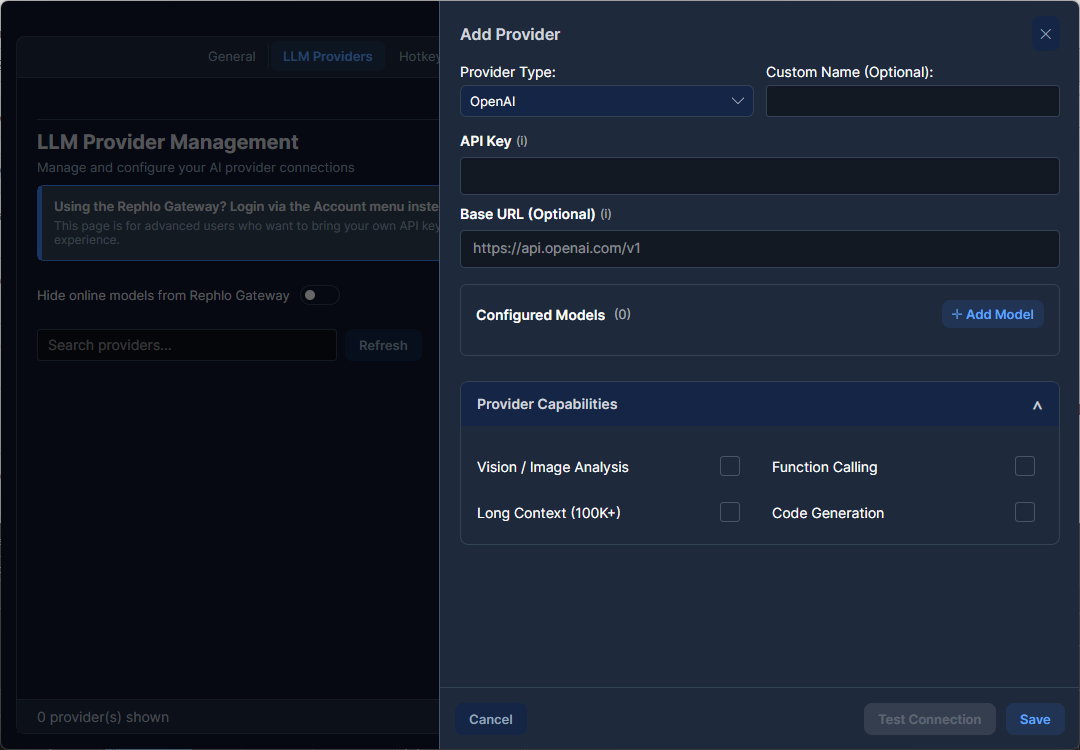
What a Provider Configuration Stores
Each provider configuration includes:
- An optional Display Name override.
- A Mode (BYOK / Dedicated) and provider type.
- Models — one or more models, with one marked as the default.
- Configuration — provider-specific fields. API keys and tokens are stored encrypted:
- OpenAI / OpenAI-Compatible: API Key, optional Base URL (and, for OpenAI-Compatible, a Model Name). Azure OpenAI uses this type — point the Base URL at your Azure deployment endpoint.
- Anthropic: API Key, optional Base URL, prompt caching enabled by default.
- Google: API Key, optional Base URL.
- Groq: API Key.
- Ollama: Base URL, optional API key (for web search).
- xAI (Grok): API Key, optional Live Search toggle.
- OpenRouter: API Key, optional Site URL / Site Name.
- Capabilities — toggles for Vision, Function Calling (tools), Long Context, Web Search, Thinking, and more; validated against the model's real capabilities at runtime.
- Model Parameters — per-provider/model request settings (temperature, max tokens, top-p, etc.).
Only one provider is active at a time. You can also override the provider per command for fine-grained control.
Getting API Keys (BYOK)
When using BYOK, you pay the vendor directly for API usage.
| Provider | Where to Get Keys | Notes |
|---|---|---|
| Azure OpenAI | portal.azure.com | Requires an Azure subscription + a deployed OpenAI resource |
| OpenAI | platform.openai.com | GPT-class models |
| Anthropic | console.anthropic.com | Claude models; supports prompt caching |
| Groq | console.groq.com | Free tier available |
aistudio.google.com | Gemini Pro / Flash | |
| xAI | console.x.ai | Grok models; optional Live Search |
| OpenRouter | openrouter.ai | One key, 100+ models |
| OpenAI-Compatible | Varies by service | vLLM, LocalAI, LiteLLM, LM Studio |
| Ollama | local install + ollama.com/settings/keys | Local models; API key only needed for web search |
Switching Providers
You can switch providers globally (default for all commands) or per-command. For example, use Groq for quick spell-checks (fast and cheap) and switch to Claude for complex analysis (smart and nuanced).
Provider Comparison Guide
| Provider | Best For | Speed | Privacy |
|---|---|---|---|
| Azure OpenAI | Enterprise, compliance | Fast | Cloud |
| OpenAI | General, coding, analysis | Fast | Cloud |
| Anthropic (Claude) | Writing, long docs, caching | Fast | Cloud |
| Groq | Quick tasks | Ultra-fast | Cloud |
| Google (Gemini) | Multimodal, research | Fast | Cloud |
| xAI (Grok) | Real-time knowledge | Fast | Cloud |
| OpenRouter | Multi-model access | Varies | Cloud |
| OpenAI-Compatible | Self-hosted, custom | Varies | Self-hosted / cloud |
| Ollama | Privacy, offline | Depends on HW | On your machine |
Specific model names and context-window sizes change frequently. To see exactly which models each provider exposes — and how to override the model per command or per conversation — read Models & Inference.
Next Concept: Explore the Dashboard & Navigation.