LLM Providers
The LLM Providers tab in Settings is where you connect Rephlo to the AI models that power your commands and chats. You can plug in your own accounts at the major AI vendors, run models locally for complete privacy, or let Rephlo manage everything for you with no keys at all.
Open it from Settings → LLM Providers.
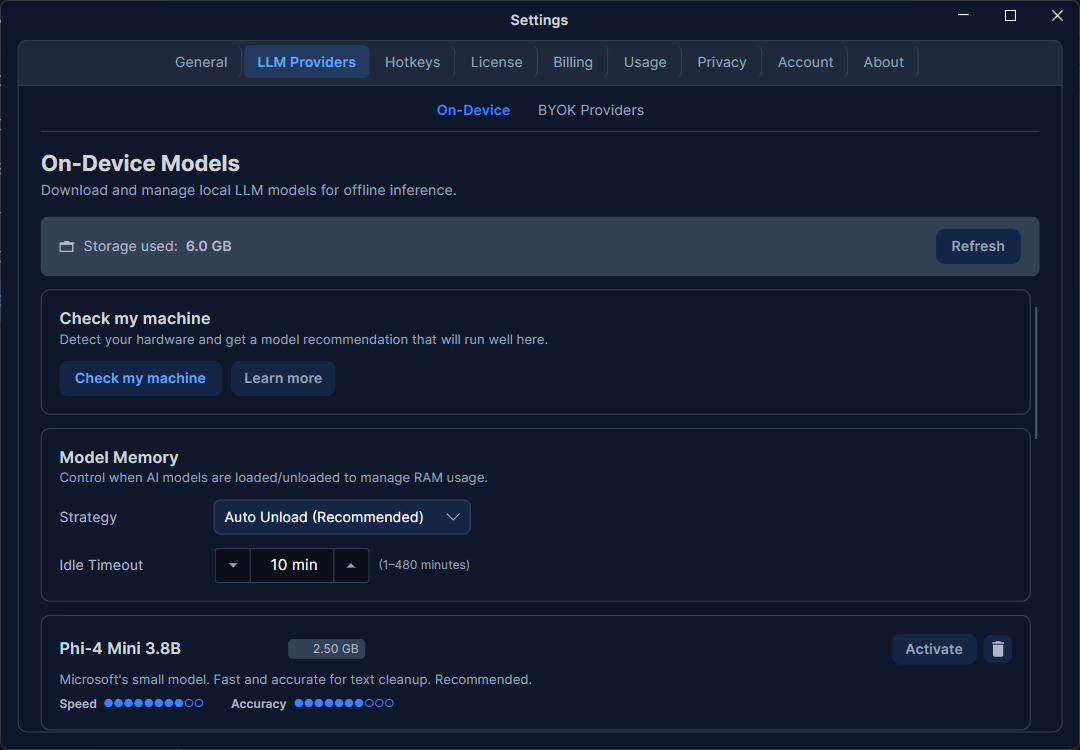
Two ways to use providers
| Mode | How it works | Best for |
|---|---|---|
| Login (Dedicated API) | Rephlo runs the inference for you. No API keys to manage — usage draws from your plan's credits. | Anyone who wants zero setup. |
| BYOK (Bring Your Own Key) | You add your own API key from a provider (OpenAI, Anthropic, etc.). You pay that vendor directly and use their latest models. | Power users who already have provider accounts. |
You can mix both: stay signed in for everyday use and add a BYOK provider for a specific model. For how billing and credits work, see Credits & Usage and Plans & Pricing.
Supported providers
Rephlo supports eight BYOK provider types — seven cloud vendors plus local Ollama (which runs on your own machine at localhost:11434) — alongside on-device and managed options:
| Provider | What you supply |
|---|---|
| OpenAI | API key (optional custom endpoint) |
| Anthropic | API key (optional base URL); supports prompt caching |
| API key (optional base URL) | |
| Groq | API key |
| xAI (Grok) | API key (optional Live Search) |
| OpenRouter | API key (optional site URL/name for the OpenRouter dashboard) |
| OpenAI-Compatible | Base URL + API key + model name (Azure OpenAI, vLLM, LocalAI, LiteLLM, and similar) |
| Ollama | Base URL (default http://localhost:11434); optional key for web search |
| On-Device | Nothing — models run locally. See On-Device Models. |
| Dedicated API | Nothing — managed by Rephlo when you sign in. |
Azure OpenAI is connected through the OpenAI-Compatible type — point the Base URL at your Azure deployment endpoint — not as a separate entry in the add-provider list.
For a conceptual overview of how providers and models relate, see Providers and Models & Inference.
Adding a provider
- Click Add Provider.
- Choose the provider type. The form adapts to show only the fields that provider needs.
- Enter your credentials (for example, an API key, or an Azure endpoint + deployment name).
- Optionally set a custom name so the provider is easy to recognize in lists.
- Click Test Connection to confirm the key works before saving.
- Click Save.
Your keys are encrypted
API keys and tokens are encrypted before they are stored on your machine. They are never written to logs and are excluded from data exports. Treat your keys like passwords — Rephlo keeps them local and protected.
Models
Each provider exposes one or more models (for example, an OpenAI provider can offer several GPT models). You can add multiple models to a single provider and mark one as the default. When you run a command or chat, Rephlo uses the active provider's default model unless the command or conversation specifies a different one.
In the model picker, locked Dedicated (Gateway) models your plan doesn't include show a tier badge (for example PRO or ENTERPRISE) and a lock icon, so you can see at a glance which models your plan covers. Starting a brand-new chat, or opening Chat with no model already set for that conversation, resumes the model you last used globally — a separate memory from the per-conversation model choice.
To learn how per-command and per-conversation model overrides — and this global "last used" memory — work, see Models & Inference.
Hide online models from Rephlo Gateway
The On-Device and BYOK Providers sub-tabs both include a Hide online models from Rephlo Gateway toggle (tooltip: "When enabled, hides online models from Rephlo Gateway"). Turning it on hides Dedicated (Gateway) models from every model-picker surface — the status bar, chat, and the overlay.
Since v1.4.1, if your active model is a Gateway model when you enable the toggle, Rephlo automatically switches you to an accessible on-device or BYOK model instead of leaving you silently on the now-hidden one — or deactivates the model if none is available.
Capabilities
Each provider configuration carries a set of capability flags that tell Rephlo what the model can do:
- Text generation — always on.
- Vision — analyze images (only for vision-capable models like GPT-4o, Claude, Gemini).
- Function calling / tools — structured tool use, required for MCP connectors.
- Long context — handle very large inputs (>100K tokens).
- Streaming — show responses token by token (on by default).
- Web search and Thinking — where the model supports them.
Capabilities are validated against the model's real abilities at runtime, so enabling a flag a model doesn't support won't break anything — Rephlo simply won't attempt that operation.
Model parameters
You can tune generation behavior per model:
- Temperature — lower values are more precise and repeatable; higher values are more creative.
- Max tokens — caps the length of each response.
- Top-p / top-k — additional sampling controls for advanced users.
A command can override these for its own runs, so you can keep a calm, low-temperature default while letting one brainstorming command be more adventurous.
Anthropic prompt caching
Anthropic providers support prompt caching, which can cut the cost of repeated context by a large margin. It is enabled by default with an "ephemeral" cache (about 5 minutes). An "extended" option (about 1 hour) is also available. Caching only kicks in when a request actually carries cacheable context — see Prompt Caching for the full story.
Ollama and local models
For Ollama, set the base URL (default http://localhost:11434). On limited machines, watch the context window so you don't run out of memory. If you'd rather have Rephlo download and manage local models for you, use the built-in On-Device Models catalog instead.
Editing, testing, and removing
- Edit any provider to update its key, add models, or change parameters.
- Test Connection re-validates a provider after a key rotation.
- Remove a provider you no longer use. Removing a provider does not delete your commands — they fall back to your active provider.
Common settings
Every provider also has shared options:
- Request timeout (default 60 seconds)
- Max retries for transient failures (default 3)
- Streaming on/off