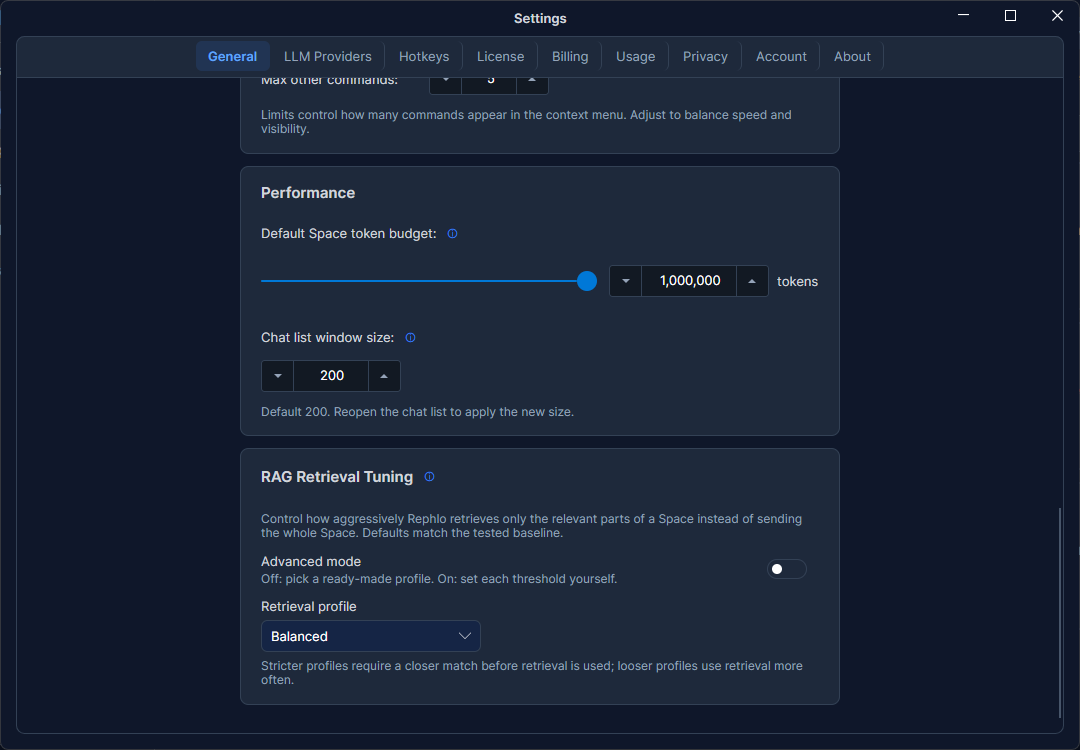
RAG Retrieval & Tuning
When a command or chat uses a Space, Rephlo doesn't blindly stuff every document into the prompt. Instead it retrieves the passages most relevant to your request and injects only those — a technique called Retrieval-Augmented Generation (RAG). The RAG Retrieval settings let you tune how aggressive or generous that retrieval is.
You'll find this section near the bottom of Settings → General.
Why tune retrieval?
Retrieval is a balancing act:
- Too strict, and Rephlo may leave out useful context, giving thinner answers.
- Too lenient, and it pulls in marginally-related text, wasting tokens and sometimes adding noise.
The defaults work well for most people. Tuning helps when you have an unusual Space — very large, very technical, or full of near-duplicate content — and want to nudge the balance.
Basic vs. Advanced
There are two modes. Most users only need Basic.
Basic mode (default)
Pick a single strictness profile and Rephlo applies a sensible set of values for you:
| Profile | Behavior |
|---|---|
| Very Lenient | Retrieves broadly — favors including more context. |
| Lenient | Slightly relaxed retrieval. |
| Balanced | The default — a good middle ground for most Spaces. |
| Strict | Tighter — only clearly relevant passages. |
| Strictest | Most selective — only the highest-confidence matches. |
Just click a profile; the change saves automatically.
Advanced mode
Toggle Advanced to edit the underlying knobs directly. When you switch in, the fields are pre-filled from your current profile so you have a sensible starting point. Available controls:
- Similarity floor — the minimum relevance score a passage must clear to be considered.
- Selected-ratio cutoff — how much of the candidate pool to keep.
- High-confidence threshold — the bar for treating a match as clearly relevant.
- Minimum chunks — a floor that keeps retrieval from returning too little.
- Minimum Space size (tokens) — the cutoff below which a Space is small enough to send in full instead of retrieving from it (default 4,000). This is the dividing line that Smart Search uses: at or below it, Rephlo sends the whole Space; above it, Rephlo retrieves only the most relevant parts. Raise it to keep scanning everything for larger Spaces.
- Command context budget (tokens) — how many tokens of retrieved context a command may use. Default 4,000. Raised from 2,500 in v1.4.0, so commands now see more of your documents by default — the same budget as chat.
- Chat context budget (tokens) — how many tokens of retrieved context a chat may use. Default 4,000.
- Large-Space command guard (tokens) — default 10,000. Above this size, Rephlo prompts you to refine your command before sending a whole Space.
- Inject-All Ceiling (tokens) — default 50,000. Caps how much a fallback full-Space send can inject, regardless of the Space's actual size.
Token budgets are automatically clamped to safe limits and to what your provider can actually handle, so you can't set a value that would break a request.
Saving and resetting
- Auto-save — every change you make is saved immediately, just like the rest of Settings. There's no separate Save button.
- Reset to Defaults — restores the factory defaults: Basic mode with the Balanced profile.
If retrieval tuning ever isn't available on your machine, Rephlo quietly falls back to its built-in defaults — your Spaces still work.
How this fits with data modes
RAG retrieval applies to every Space, whatever its data mode — it always retrieves over the Space's raw chunks. A 🗜️ Compact Space above the Minimum Space size floor still gets the relevant retrieved passages on a normal request, not the full AI summary. The data mode only changes what's sent on the fallback — a Space at or below Minimum Space size, or no confident match: a 🔍 Smart Search Space sends each file's full raw text, for free, while a 🗜️ Compact Space sends each file's AI summary, which costs credits to build. For the full picture, see Data Modes & Compaction.
Retrieval can only find text that was extracted. For a scanned document, that means recognition has to have run first — and a document marked Partial OCR is only searchable over the pages that were indexed. See How Rephlo Reads Your Files if a document you added isn't turning up in results.